Measuring AI visibility right inside WordPress – the score feature in the LLMs.txt Generator
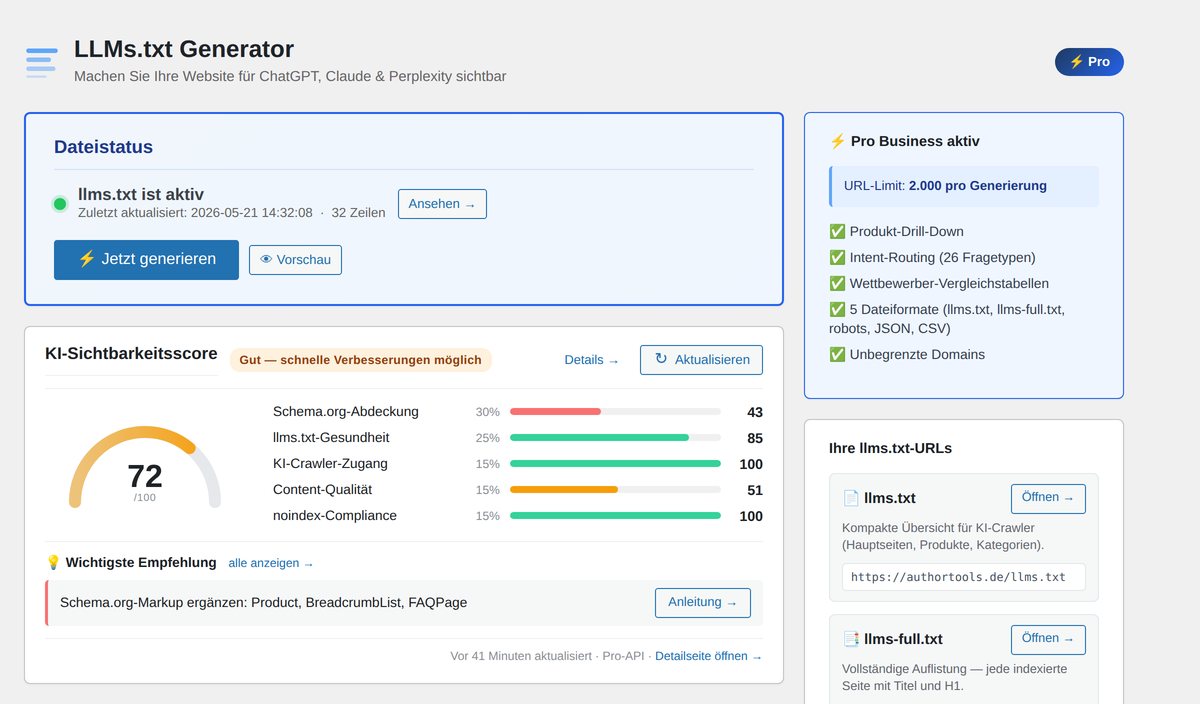
If you want to be visible to ChatGPT, Claude and Perplexity, you optimise similar things as for Google – just for different crawlers, different data structures and different evaluation logic. Until now that was a gut feeling. With the AI Visibility Score in version 1.5.1 of the LLMs.txt Generator plugin it becomes a measurable number: a Lighthouse-style 0–100 value that shows you in five weighted sub-scores exactly where your WordPress site is strong and where you''re losing points. Right inside the admin area, no external services, no spreadsheet.
Why AI visibility has to be measurable in the first place
Search engine SEO has had a decades-old toolchain: Google Search Console, Lighthouse, Core Web Vitals, indexed pages. If you want visibility, you know your numbers. For AI visibility – the question whether ChatGPT, Claude or Perplexity can find, understand and cite your content – that toolchain is new. There''s no Google Search Console for GPTBot, no Bing Webmaster for ClaudeBot, no Lighthouse report for AI crawlers.
That''s exactly the gap the AI Visibility Score fills. It takes five objective signals that every AI crawler pipeline evaluates, weights them by effect, and expresses them as a single value between 0 and 100. You see immediately whether your site is AI-ready – and which three levers will move the needle most.
Important detail: the score runs entirely in the WordPress backend. No external sign-up, no cloud processing in Free mode, no data shared with third parties. The calculation happens once per call and is cached for six hours. If you want it faster, click the Refresh button next to the score card.
The score at a glance: five weighted sub-scores
The overall score is weighted, not just averaged. Two reasons: First, the sub-scores don''t have the same impact on AI visibility – a missing Schema.org markup matters more than a too-short meta description. Second, it makes it transparent why you land at 72 points and not 80. These five areas are checked:
- Schema.org coverage (30 %): Structured data on products and pages – the most important signal for AI understanding.
- llms.txt health (25 %): Existence, recency and completeness of the llms.txt itself.
- AI crawler access (15 %): Does your robots.txt let GPTBot, ClaudeBot & co. in at all?
- Content quality (15 %, Pro only): Title lengths, meta descriptions, H1, alt-tags and Open Graph per sample page.
- noindex compliance (15 %): Are noindex-marked pages reliably excluded from llms.txt?
In Free mode the 15 percent for content quality is redistributed proportionally to the other sub-scores – so the Free score isn''t a paywalled half-result but a full 100-point value based on what can be measured locally.
Schema.org coverage (30 %): the hardest discipline
Structured data is the biggest lever for AI visibility. Where Google manages without Schema.org markup (in a pinch), most AI crawlers only understand what a page actually is – product, article, person, company, FAQ, how-to – via Schema.org. The plugin takes up to ten WooCommerce products as a sample and checks three things: is there valid Product markup, does it include a price, and is an Offers object embedded?
Sites without WooCommerce are evaluated differently – here it counts whether the homepage has valid Organization or WebSite markup. So you get this sub-score whether you run a shop or not.
llms.txt health (25 %): does it exist, is it fresh, is it complete?
This section checks six criteria around llms.txt itself: does the file exist? Does it have a title? Are structured sections present? Are enough pages listed to be useful? Is it younger than 30 days? Does a parallel llms-full.txt exist for deeper AI crawlers? Each check is a mini-boolean, weighted by importance – and the sub-score is the result of that weighting. A freshly generated llms.txt with title, sections, at least five URLs and a parallel llms-full.txt hits the full score.
The chance of this section going red is low once you have the plugin installed at all – but it''s in the score anyway, because outdated or broken files do occur in the wild. In Pro mode the plugin regenerates automatically on every content update, so this value stays at 100 permanently.
AI crawler access (15 %): who''s in, who''s out
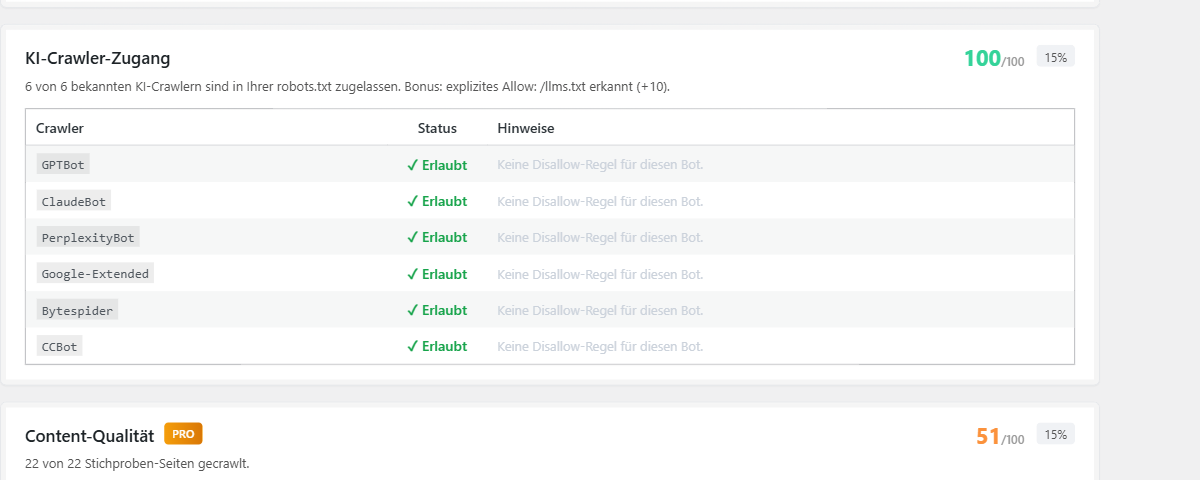
This section reads your robots.txt and checks whether the six most important AI crawler user-agents are allowed: GPTBot from OpenAI, ClaudeBot from Anthropic, PerplexityBot from Perplexity, Google-Extended for Gemini, Bytespider from ByteDance and CCBot from Common Crawl Foundation. One line each, status green or red. Bonus: if your robots.txt explicitly contains Allow: /llms.txt, you get ten extra points – making clear you''re not just passively tolerating crawlers but actively inviting them.
If one or more crawlers are blocked, the plugin auto-generates a copy-ready robots.txt snippet with the matching Allow rules. You paste it into your robots.txt and you''re reachable for every relevant system – without needing to know which user-agent strings are current right now.
Content quality (15 %, Pro): measurable per sample page
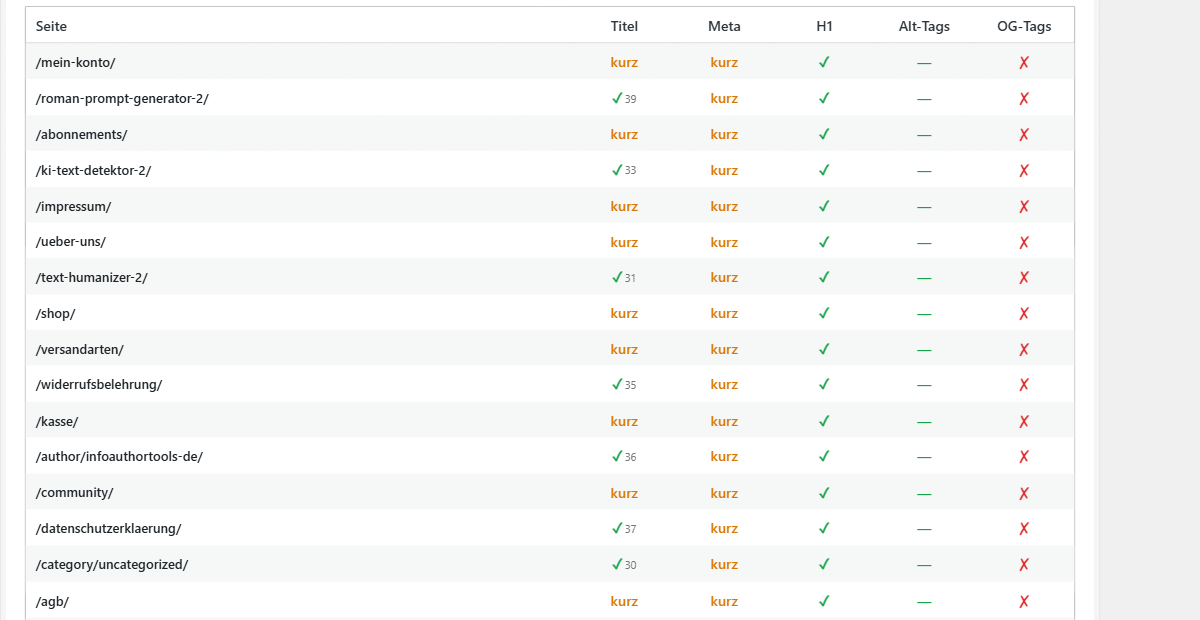
The only sub-score that requires the Pro API – for good reason: this is where the external crawler hits a sample of your pages and measures five metrics per page: title length in characters, meta description length, whether an H1 is present, the alt-tag ratio on images and whether Open Graph tags are set. Sample size depends on the tier: 25 pages on Pro Solo, 25 on Pro Business, 50 on Agency.
The table shows not just "Pass" or "Fail" but the actual value. A title with 38 characters is shown as 38 – you see immediately whether the page is just under or way under. That granularity is missing in nearly every other SEO tool because it would be too detailed for classic search. For AI understanding it''s exactly right: an 11-character title isn''t "too short" to GPTBot, it''s "information missing".
noindex compliance (15 %): no secret URLs leaking to AI
If a page is marked noindex in Yoast SEO, Rank Math, AIOSEO or SEOPress, the site operator made a clear choice: this page should not appear in search engine indexes. Logically it shouldn''t be in llms.txt either, because llms.txt then becomes a back door for AI indexing – the opposite of what the SEO config intended.
The plugin automatically detects the active SEO plugin and filters noindex-marked content out of llms.txt. The compliance check confirms that this filtering works. You get the full score when no noindex page appears in llms.txt – and all noindex flags from the active SEO plugin are recognised correctly.
The detail page: see exactly where you''re losing points
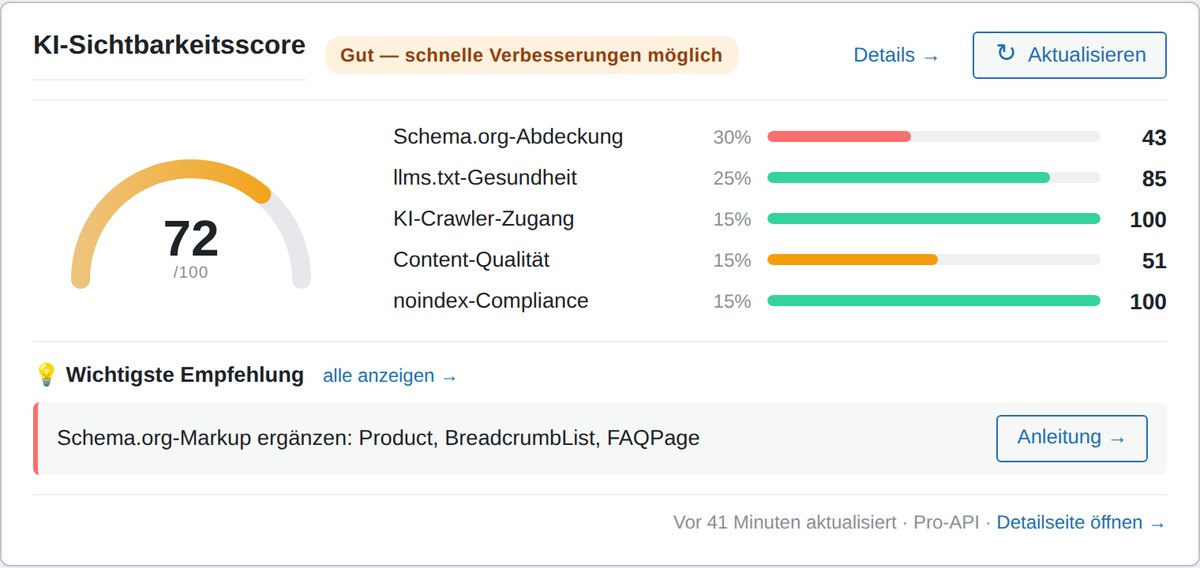
Version 1.5.0 added the detail page – you reach it via LLMs.txt → AI Visibility Score in the WordPress menu, or via the "Details →" link on the main card. Here you see not just the values but the data behind them: every single sample page with all checks, every checked product with schema status, every crawler with reasoning.
A clickable sub-score bar on the main card scrolls directly to the matching section on the detail page. If you want to know why content quality is red, you click once and you''re in the sample table. That used to be the main bottleneck: you saw the score, but had no idea where the point was being lost. With drill-down that''s solved.
Score history: the 30-day sparkline for Pro licenses
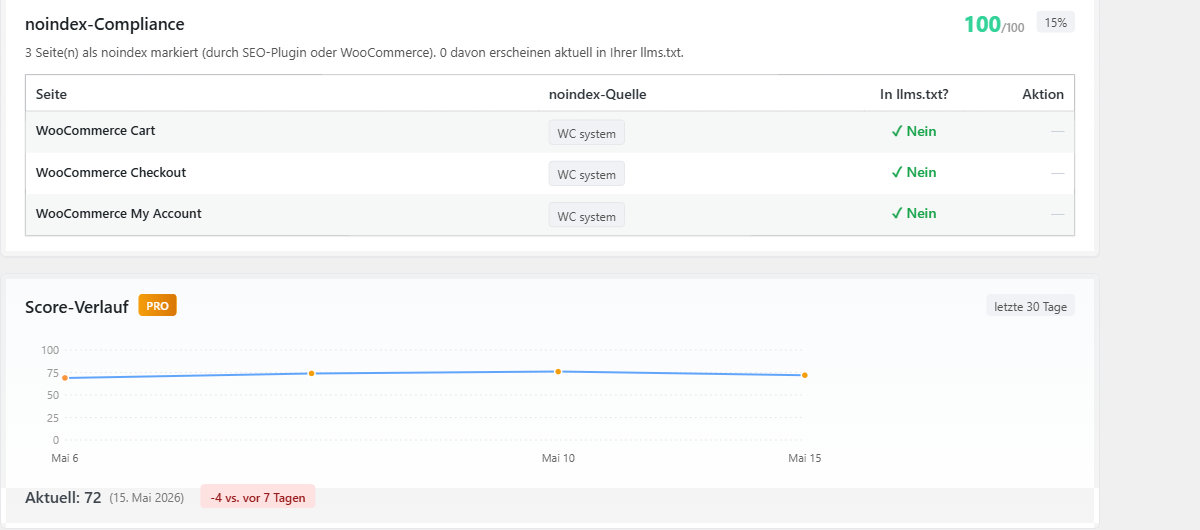
Free users get a point value, Pro users get a line. The sparkline plots the past 30 daily snapshots, with data points in the respective tier colours (red, orange, yellow, green), and shows the week-over-week delta below the chart. This visualises what otherwise stays gut feeling: whether your Schema.org improvements really raised the score or whether it''s just caching effects creating fluctuations.
Snapshots have been recorded automatically since version 1.4.0 – also for Free users. So if you later upgrade to Pro, you have 30 days of history immediately, no waiting period.
Smart Recommendations: three concrete actions, one click each
Below the score card are the three most important recommendations. Not generic – derived from your score: if Schema.org markup is missing, the plugin suggests "Add Schema.org markup: Product, BreadcrumbList, FAQPage" and links straight to the guide. If llms.txt is stale, there''s a "Regenerate now" button. If a crawler is blocked, a "Copy robots.txt snippet" button.
That turns the score from a diagnostic tool into a working tool. You see the problem, click once, and either it''s fixed or you have a concrete guide with next steps – including source code to paste.
What Free gets you, what Pro adds
In Free mode all five sub-scores run without the Pro API – except Content Quality, which needs an external crawl sample. Free users get four out of five sub-scores fully executed and one rebalanced. The score stays a full 0–100, just without the deep per-page drilldown on Content.
Pro adds five things: the Content Quality table with real sample data, the 30-day score history sparkline, the manual Re-Crawl button (with a 30-minute cooldown so it can''t become a DDoS machine), the Pro API crawl of llms.txt itself (instead of just local WordPress data), and the larger sample size – 25 pages on Solo and Business, 50 on Agency.
Installation: three steps, done
Under Plugins → Add New → Search for aiready-llms-txt-generator. Click Install, then Activate. A new LLMs.txt menu item appears in the WordPress admin – click it once, click "Generate now", and llms.txt sits at your-domain.com/llms.txt. The AI Visibility Score is calculated in the background and is visible at the top of the main page as soon as the first generation completes. For Pro, click the Pro tab, enter your license key, done.
Frequently asked questions
How often is the score updated?
Automatically every six hours, cached for performance. If you want it sooner, click the Refresh button next to the score card. Pro users additionally get a Re-Crawl button on the detail page that re-runs Content Quality – with a 30-minute cooldown.
Do I need WooCommerce for this to work?
No. Without WooCommerce the Schema.org sub-score is calculated from the homepage and any Organization or WebSite markup. With WooCommerce, Product schema checks are added on top – so the value is bigger for shops, but the plugin is useful for any WordPress site.
Is my data sent to external servers?
Not in Free mode. Four out of five sub-scores run purely locally in WordPress. Only Pro mode sends your public website URL to the llmstxtgenerator.de crawler API to measure Content Quality per page. No personal data, no cookies, no tracking pixels. The plugin is GDPR-compliant.
What''s actually a good score?
From 70 points the site is AI-ready in an operational sense – meaning ChatGPT, Claude and Perplexity can understand and cite it. From 85 you''re in top-site territory. 100 points is technically possible but rare – there''s always some Schema.org detail or meta description that could improve.
Can the score data be exported?
Yes. The detail page has two export buttons: "Export as JSON" downloads the full audit as a structured file, "Export as CSV (ZIP)" packages five separate CSVs into a ZIP – one per sub-score. Ideal for reporting, agency handovers or your own data pipeline.
What''s new in version 1.5.1?
Two UX fixes versus 1.5.0: the score card now sits at the very top of the plugin dashboard (previously buried below all the settings) and a stale "Last error" message from older installations is cleaned up on page load. Functionally 1.5.1 is identical to 1.5.0, just more findable.
⚡ Tip for agencies and in-house SEOs
The CSV ZIP export is structured so each sub-score CSV can be imported individually into Excel or a reporting tool. One export per client site per month and you have a reproducible AI visibility audit that can be shared without plugin access.
More background on the plugin on the plugin overview page. The full changelog – including versions 1.4.0, 1.5.0 and 1.5.1 – is on WordPress.org.